Powerhouse
How things work around here
Getting in
Weekdays 8:30am to 5pm the front door is open to anyone. Outside those hours, and all weekend, you need a fob.
Who gets a fob
- Private offices and dedicated desks: a fob each, and 24/7 access
- Hot desk, Flex and day passes: business hours, through the front door, on the ground floor. No fob needed
Each fob has a $25 refundable deposit, returned when you hand it back at the end.
Getting in and out after hours
Hold your fob to the reader at the front door. Your first swipe in also turns the alarm off, so if you are the first one in, that is all you need to do.
To leave, use the front door. You do not need to swipe out of it.
The building is locked on
Weekends, public holidays and the Christmas closedown. Fob holders can still get in as normal.
If the alarm goes off while you are inside
Swipe your fob at a door and it turns off. Then let Jack know, so he is not surprised by a call from the alarm company.
The door will not open, or you have lost your fob
Ring Jack on 022 080 5712.
If a fob is lost, tell Jack straight away, even if you think it will turn up, so it can be cancelled. A lost fob is a key to the building in somebody else's pocket.
Where things are
Ground floor, looking down. The street is on the left, the car park along the bottom. Tap a numbered thing to jump to how it works.
- 1Front door
- 2Toilet
- 3Accessible toilet
- 4Lift
- 5Stairs
- 6Car park entry
- 7Toilet
- 8Meeting room
- 9Boardroom
- 10Rear door
- 11Printer to check
- 12Kitchen to check
- 13Lounge to check
- 14First aid kit to check
- 15First aid kit (tea bag drawer) to check
Levels 1 and 2 are offices and dedicated desks, reached by the lift or the stairs (5 and 6). Same toilets on every floor, same position each time, so if you can find them down here you can find them up there.
Upstairs, three things are worth knowing:
- There is a kitchenette on both upper floors, so you do not have to come all the way down for a glass of water or to rinse a cup.
- Phone booths are on level 1 front and level 2 front. The level 1 rear half does not have one, so if you are back there, the nearest is around the corner.
- The building's only shower is on level 2, in the bathroom on the left past the kitchenette. Handy if you ride or run in.
The lift
In the middle of the building, next to the stairs, on every floor. Wheelchair sized. Slow, but reliable.
Mind the beam
There is no inner door. Instead, an invisible safety beam runs across the doorway on the inside.
Do not cross it while the lift is moving. Stand back from the doorway, and keep hands, bags, feet and dogs clear of it until you have stopped and the doors open.
Office hours only
Use the lift weekdays, 8:30am to 5pm. Outside those hours, take the stairs: if it stopped between floors in the evening or at the weekend, there may be nobody around to help.
Never in a fire or an earthquake
If the fire alarm is going, or after an earthquake, always use the stairs. See If something goes wrong.
It is playing up
Do not try to force the doors. Ring Jack on 022 080 5712.
Your office lock
Private offices have smart locks, opened with your fingerprint (or a code), so there is no key to lose.
Getting set up
Jack enrols your fingerprints on your first day. It is done over Bluetooth at the door itself, so it has to happen in person with Jack there.
Enrol two fingers. If one gets cut or the reader is being fussy, you have a spare.
Adding someone from your team
Every new person goes through Jack, at the door, the same way. Let him know when they start and he will book a minute with them.
Locked out of your own office
Ring Jack on 022 080 5712. A lock can only be reset from his phone, standing at the door, so it is a quick fix when he is in the building and a wait when he is not.
Wifi
Join Powerhouse Wifi. Your device is remembered once you are on, so this is usually a one-off.
A sign-in page appears by itself on most devices. Log in with your Nexudus account (the same one you use for the member portal) and you are online.
On Windows the page often does not appear on its own. If nothing happens, open a browser and go to any http site and it will come up.
Please use your own login, not a colleague's. It is how we know who is in the building if the fire alarm goes (see If something goes wrong), and it is how hours are counted if you are on a Flex Pass.
Your device is not being recognised
Some members are still on the old network from before the switch. If your name never shows up as being onsite, or the wifi behaves oddly, you are probably still on it. Come and see Jack for two minutes and it gets sorted permanently.
The wifi suddenly will not let you in
- Changed the email on your account? Forget the network on your device and log in again with the new one
- Account paused? That happens automatically when an invoice is more than 30 days overdue. See Your account
A visitor needs wifi
They scan the QR code in the meeting rooms or the lounge and register themselves. Takes about a minute and they get a code on screen. You do not need to ask anyone.
See Guests and visitors.
Meeting rooms
Three bookable rooms, all on the ground floor:
- Meeting pod, 4 people, booked as The Quiet Room. Best acoustics in the building, so it is the one to take a call in
- Meeting room, 5 to 6 people. The busiest one. 65 inch screen with a camera and speaker bar, and a whiteboard
- Board room, 8 people. Same setup, bigger 75 inch screen
Booking one
Book online at app.power-house.co.nz.
You can also book from your phone. The Nexudus Passport app does the same thing, and most people do not realise it exists. Log in with the same details.
Getting your laptop on the screen
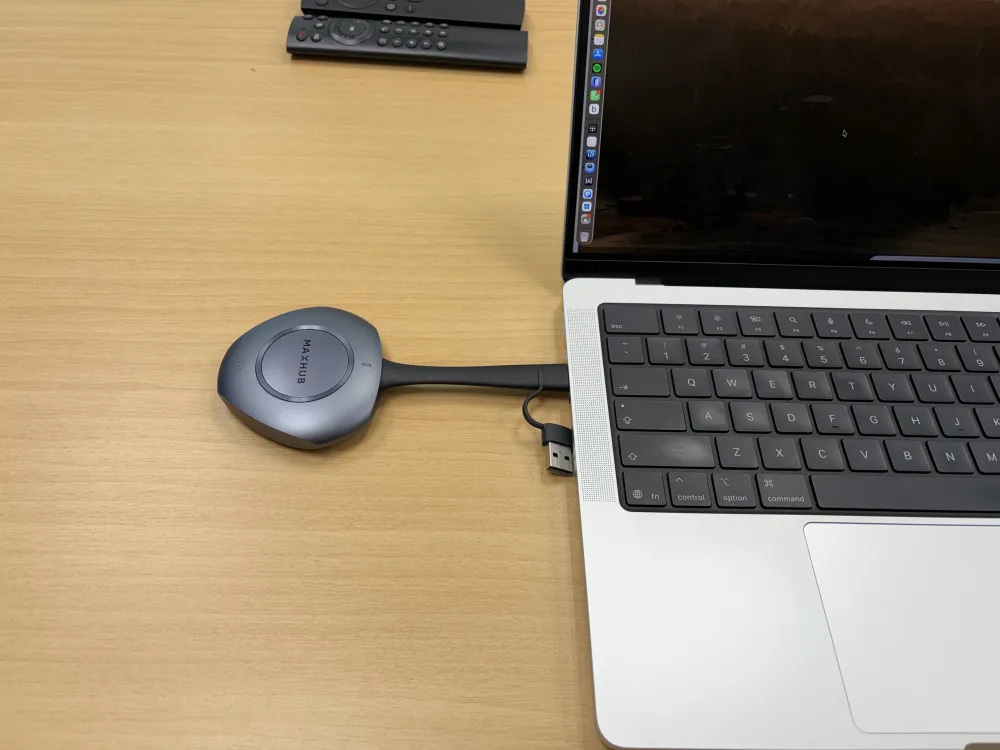
Both rooms have a MaxHub screen and a wireless dongle, so you do not need to plug your laptop into the TV itself.
- Plug the dongle into your laptop. The cable does both USB-C and normal USB, so it fits whatever you have
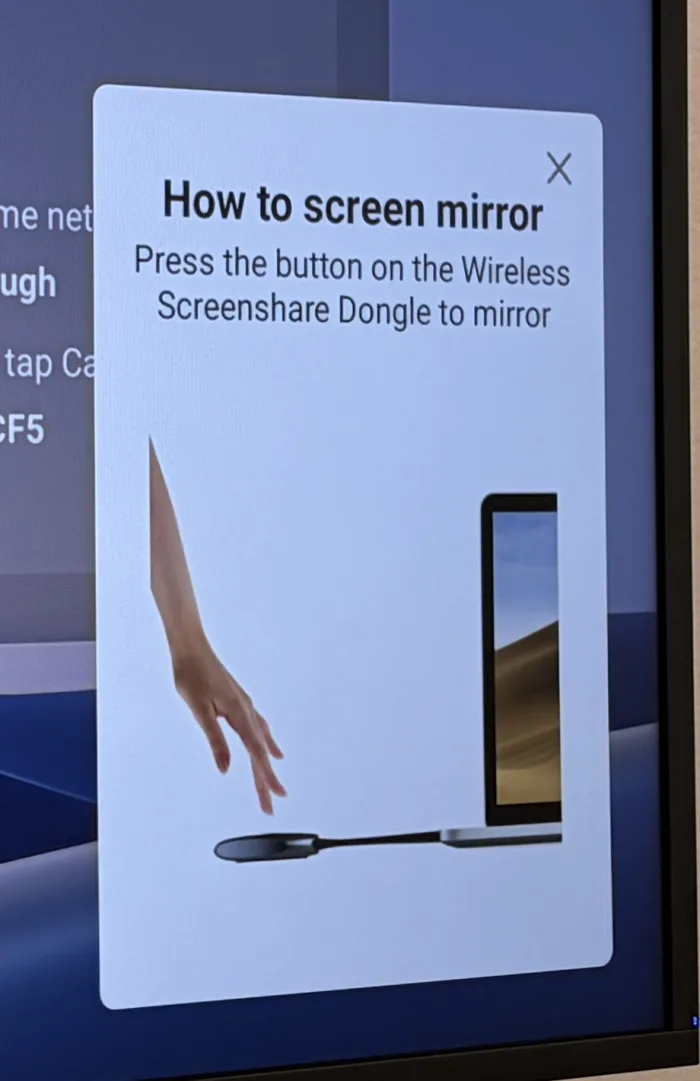
- Wait for the prompt to appear in the bottom right of the TV
- Press the button in the middle of the dongle and it connects
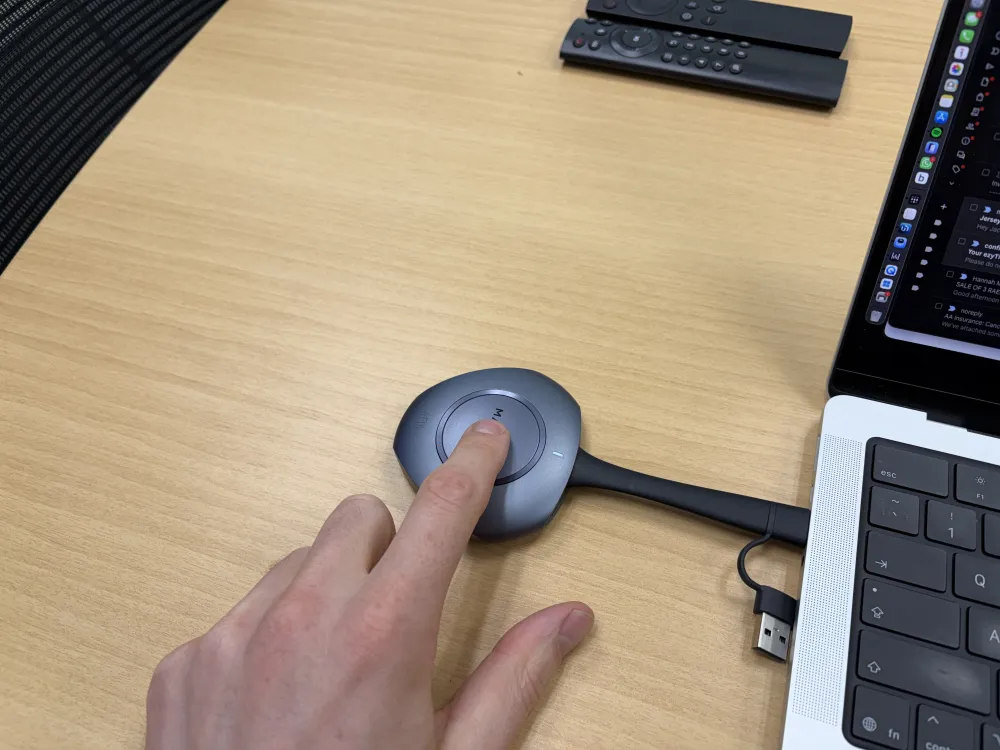
If the dongle will not play, there is a USB-C cable in the room. Plug that straight into your laptop instead.
Using the room camera and microphone
Worth doing for any call with more than one of you in the room. The TV has a camera and a speaker bar, and they are far better than your laptop's.
They do not switch over on their own. In your video call, change both:
- Camera to MAXHUB-Camera
- Microphone and speaker to MAXHUB-Audio
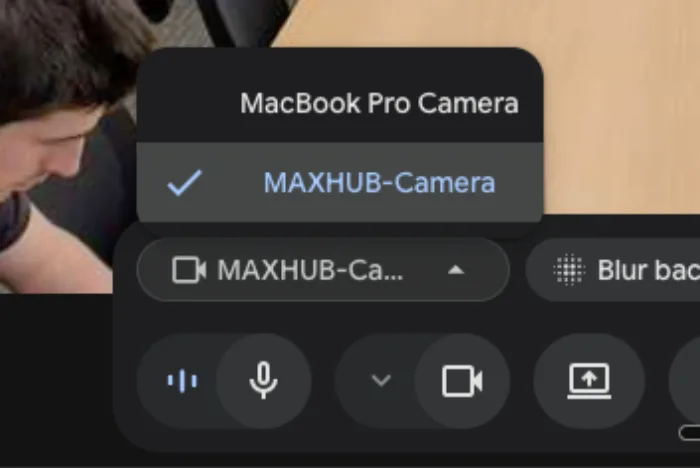
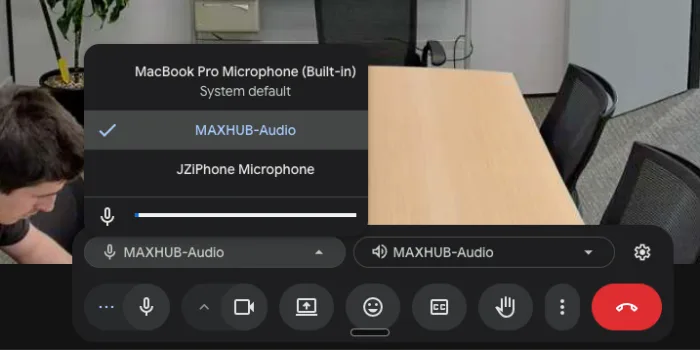
Same two menus in Meet, Zoom or Teams.
Changing or cancelling
You can cancel or change your own booking, from either the website or the app. You do not need to find Jack to do it.
If you finish early, cancelling frees the room for someone else, which is the whole point.
What it costs
Private offices and dedicated desks include meeting room use, within reason.
Monthly hot desk plans include meeting room hours every month, then it is half the published rate.
Flex pass includes 2 hours a month, then half price after that.
Virtual office plans include 1 hour a month (Address) or 3 hours (Plus), then half price.
Day passes do not include any room time and pay the full published rate.
Published rates, ex-GST:
- Meeting pod: $29 an hour
- Meeting room: $39 an hour, $130 half day, $250 full day
- Board room: $49 an hour, $165 half day, $315 full day
One full-day booking at a time
Only one of the three rooms can be on a full-day booking at any one time, so there are always two rooms left for someone who just needs an hour.
If you need a second room for a full day, talk to Jack rather than booking around it in blocks.
Phone booths
Soundproof booths for taking calls without annoying anyone, and without anyone hearing you.
Where they are
- Ground floor: two
- Level 1: one, at the front. There is none in the level 1 rear half, so if you sit back there the nearest is around the corner at the front
- Level 2: one, at the front
Using one
First come, first served. They are not booked, just walk in.
They are for calls. A long call is fine, settling in for the afternoon is not, so if you need somewhere quiet to work for a few hours, book the meeting pod instead (see Meeting rooms).
Printing
Ground floor, front half of the building, next to the bathroom.
Printing runs on uniFLOW. You send a job from your laptop, or by email, then release it at the printer with your PIN, so nothing comes out until you are standing there.
Your PIN
Your printer PIN is the number on the back of your building fob. One number for both, so there is nothing new to remember.
No fob, because you are on a hot desk plan? Jack will give you a 4-digit PIN when you start.
Setting up your laptop
You only do this once per computer.
- Download uniFLOW for Mac or Windows, from the members link above. It is also in your welcome email
- Run it and follow the steps. When it asks you to sign in, use the email address Powerhouse has for you (usually your work email)
- Print a test page, then release it at the printer (below). That first print is what finishes setting up your account, so do it on day one rather than the day you are in a hurry
Work laptop will not let you install it?
Common with company-managed laptops, and nothing you are doing wrong. Use email printing instead (next section). It ends up in exactly the same place.
Printing by email
The easy way from a phone, an iPad, or a laptop you cannot install things on.
Email the document as an attachment to:
mobileprint@powerhouseco.au.uniflowonline.com
Send it from the email address Powerhouse has for you, so it lands in your account. It waits at the printer like any other job until you log in and release it.
At the printer
- Log in on the screen with your PIN
- Your waiting jobs show up. Pick yours and print
- Log out when you are done. Otherwise the next person is printing on your account
Jobs you never release do not print, so a job sent by mistake costs nothing. Just leave it.
Scanning
Scans come back to you by email, as a PDF. Log in with your PIN, choose Scan, and send it to yourself.
Pages go either in the feed tray on top, or face down under the lid.
What it costs
Black and white A4 is included in your membership, and unlimited within reason.
Colour and A3 are charged and turn up on your next invoice:
- Colour A4: $0.23 + GST a page
- A3 black and white: $0.23 + GST a page
- A3 colour: $0.46 + GST a page
Nothing to pay at the printer and nothing to keep track of. It is totalled from your account and added to your monthly invoice.
Paper
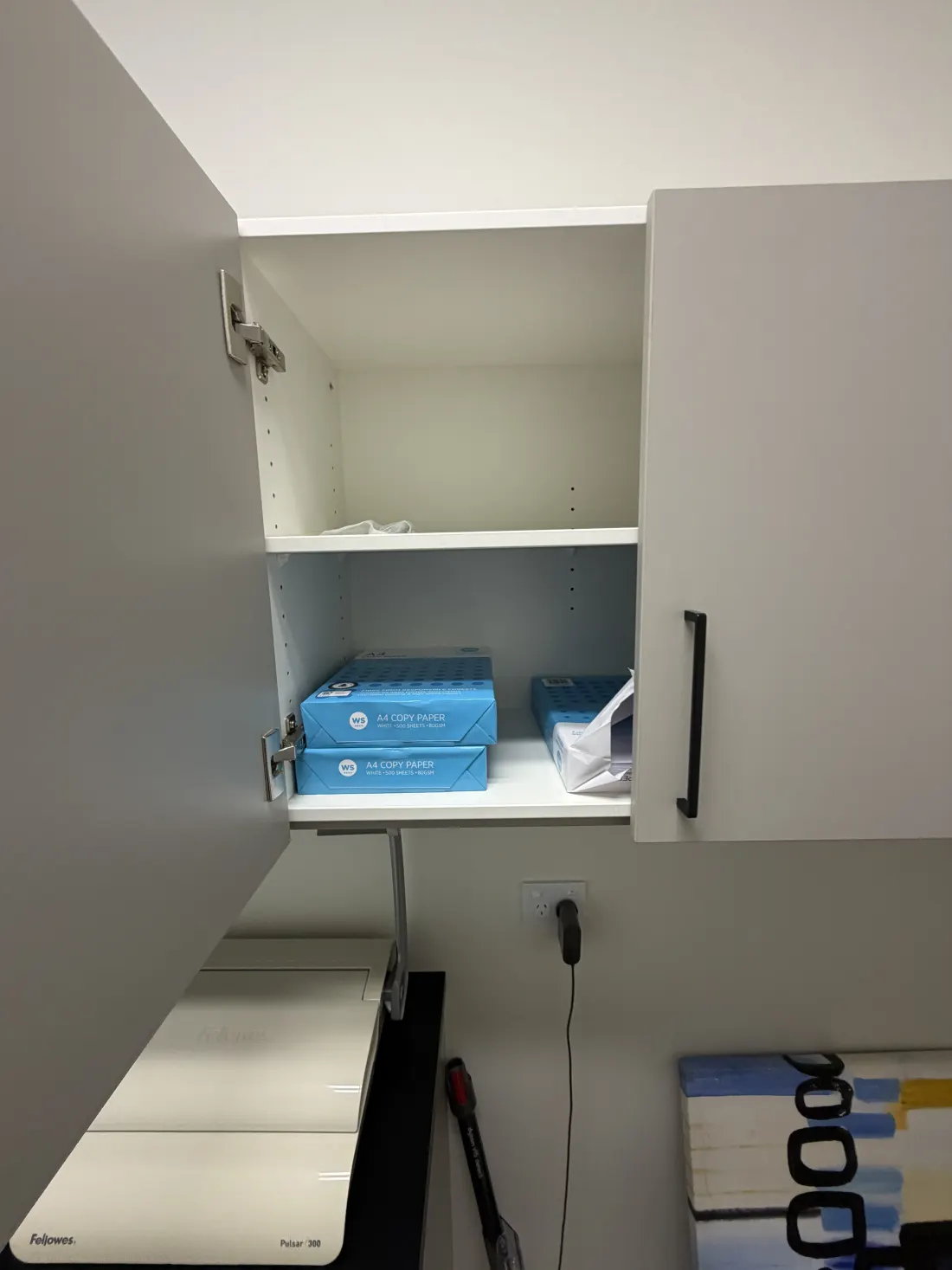
Spare paper lives in the cupboard immediately to the left of the printer.
If you use the last of it, please load more. Takes a minute and saves the next person.
Something is not right
- Paper jam: the printer shows you where it is. Open that tray or door, pull the paper out, close everything up
- Your job is not showing at the printer: check you logged in with your own PIN, and if you emailed it, that it came from the address Powerhouse has for you
- Anything else: give Jack a ring on 022 080 5712. The printer is leased and serviced by Heartland, so a real fault is a phone call rather than something to fight with
Coffee
Two machines in the kitchen, both free.
Just want a coffee
Use the bean to cup machine on the right. Push a button, it does everything.
Want to make it properly
The espresso machine is the big one. Two group heads, and the steam wand is genuinely powerful, so go gently with the milk until you have the hang of it.
Seven short clips, in order. Watch them once through and you have got it.
1. Clean and dry the group head
It should already be clean. If it is not, give it a quick rinse, then dry it with the coffee cloth. Do not skip the drying.
2. Grind and dose
Check the timer before you grind. The number on the grinder is how many seconds it will run for, and it should be sitting around 6 to 7.
If the person before you let go of the button early, the timer stops where they left it. So you can walk up to a grinder showing 1.5 seconds, grind, and get a fraction of the dose you needed. The shot comes out fast and weak and it is not your fault.
If it is showing 0 to 2 seconds, press the double shot button once to reset it, then carry on.
3. Tamp
Press as hard as you can, then a little twist, and knock the loose grounds off the rim.
4. Purge, lock in, and go
Purge the group head first to clear the old coffee out, then lock the handle in and press the button.
5. Steam the milk
Fill the jug up to the bottom of the spout. Quick purge of the wand first.
Rest the spout against the lip of the jug, put the wand just off centre, and flick it on. You are trying to get the milk spinning in a vortex.
6. Wipe the wand straight away
This is the one that matters most. Milk sets like concrete on a hot wand, and it is the milk cloth for this, never the coffee one.
7. Pour
Please
- Knock the grounds out and give the group head a quick flush
- Wipe the steam wand straight after you use it, it sets like concrete
- Rinse your jug
Beans are out
Spare beans live in the bucket under the green bin. Help yourself, fill the hopper, and give Jack a nudge when the bucket is getting low so more can be ordered before it runs dry.
The kitchen
Ground floor, at the back. Help yourself.
Free for members
- Coffee and tea. The coffee machine has its own section: Coffee
- Milk: green top is trim, blue top is full cream
- Coke Zero and beer in the fridge
- Apples, biscuits and lollies
- Chilled filtered water and an instant hot water tap
Fridges and microwaves
Two of each, shared.
Dishes
Put your dirty dishes in the dishwasher. It gets run at the end of the day and emptied in the morning, so there is no need to wash things by hand and leave them on the bench.
Upstairs
There is a kitchenette on level 1 and level 2 too, for water and rinsing a cup without coming all the way down.
Baking, every Tuesday
10:30 in the kitchen. Warm cookies, made fresh. See What's on.
The gluten free batch still has oats in it, so it is wheat free rather than safe for coeliacs.
Guests and visitors
Someone visiting you
Best: register them in the portal before they arrive, at app.power-house.co.nz. It is for health and safety (we know who is in the building) and it emails them their own wifi code.
Walk-in? Point them at the QR code by the front door. They register themselves, it tells you they have arrived, and they get a wifi code on screen.
They do not need to find anyone, and you do not need to organise anything in advance.
They just want wifi
The QR codes in the meeting rooms and the lounge do the wifi part only, without notifying anyone. Use those if the visitor is already sitting with you.
Where they park
The street out front is usually easiest. The car park is members only.
Your guest's phone has no data
They cannot load the registration page. Register them from your own phone instead, you are already online, so it works fine.
How long a guest code lasts
8 hours of connected time, and it has to be used within 10 hours of being issued.
That is connected time rather than clock time, so it does not tick down while they are sitting in a meeting with the laptop shut. Someone in and out for a day will normally get through on the one code.
If they do run out, they scan again and get a new one.
Mail and deliveries
Your address
Use this, with your name and company on the first lines:
114 Peterborough Street, Christchurch Central 8013
A business address is included with private offices, dedicated desks and monthly hot desk plans. Flex and day passes do not include one, but there is a separate Address plan if you need a Christchurch address for your business. Ask Jack.
A courier is coming
Couriers usually leave things on the ping pong table, and they get moved to the bench by the printer. If you are expecting something, look there first.
Virtual address members
Your mail is held for you to collect in person, weekdays 8:30am to 5pm, for up to 30 days. It is never opened, scanned or forwarded.
Parking
Onsite parking off the right of way at the back. $250 + GST a month for your own bay, subject to one being free. Ask Jack.
Getting in
The car park gate has a keypad. Jack gives you the code when you start.
Which bay is mine
Bays are numbered. Jack will tell you yours when you start, and it is worth writing down somewhere you will find it again.
The numbers are painted on the ground, so if you forget yours you can work it out standing there rather than having to ask.
⚠ Your bay is not contractually yours. The licence sells you a car park rather than a specific bay, so on a rare day you might be asked to move. In practice everyone stays put.
Car park sharing
Members with a bay release it on the days they are away, and anyone else can book it. It runs on WhatsApp.
To join: message the bot once and Jack approves you, then you are in.
There are no commands to remember. Message the bot anything at all and it replies with a menu:
- Set my week, free your bay on the days you are out
- My parks, see who has taken what this week
- Keep a day, take back a day nobody has claimed yet
- Book a park, get a bay on a day you need one
- Statement, what you are owed and what you owe
- Change my price, set your own daily rate
Sunday evening it messages you to set the week ahead. Ignore it if you are in all week, nothing happens unless you free a day.
Using someone else's released bay
Message the bot and it shows what is free that day. Tap one to claim it.
First tap wins, so if a bay vanishes while you are looking at it, someone else got there first. Message again for the current list.
Payment
You pay the member who released the bay, direct. Their price is shown before you claim, so you always know what you are agreeing to.
A statement goes out monthly showing what you used and who to pay. You can also text statement to the bot any time.
EV charging
There is a charging outlet for members with a bay, at $40 + GST a month. Ask Jack.
Bike parking
Covered bike shed at the street end of the car park, room for 4 or 5 bikes. Ask Jack for access.
The building's shower is on level 2.
Heat, lights and music
Too hot or too cold
The heat pumps run on a schedule, coming on at 7:45 on weekdays.
If your area is too hot or too cold, tell Jack rather than changing the controller. On level 1 one controller sets heating or cooling for that whole half of the floor, so changing it for you changes it for everyone around you.
Internal offices have a fresh air fan switch on the wall. Turn it on if the room gets stuffy.
Lights after hours
Some areas are on a timer: on at 8am on weekdays, off at 6:30pm.
Working late? Switch them back on. They stay on for an hour on a weeknight, or two hours at the weekend, then go off again. Press the switch again if you are still there.
Music
Music plays downstairs 8am to 6pm on weekdays.
Scan the music QR code with your phone to change the station. No app, no login.
Playing your own music
Got Spotify Premium? On the building wifi, open Spotify, tap the speaker icon and pick Powerhouse Casual. It plays through the casual area speakers.
- Last to connect wins, so be kind about it
- Your Spotify name shows on the music page while you are playing
- Pausing, or anyone picking a station, hands it back to the radio
Free Spotify accounts cannot do this, that is a Spotify rule rather than ours.
What's on
Baking, every Tuesday
10:30 in the kitchen. Warm cookies, a cup of tea, ten minutes away from the desk. It has run every week for over six months.
Drinks, about once a month
From about 4pm. The date gets picked by a quick poll, and the details go out by email.
GeoGuessr, most days
A quick guess-where-you-are game on Street View. A poll goes up in the Geo Guessr WhatsApp chat with the start times, and everyone who votes gets emailed the link. It gets competitive.
The WhatsApp chats
Two of them, both opt-in:
- General, for day to day building things and what's on
- Geo Guessr, for the daily game
Member sessions
Every so often someone runs a session for the building, like a CPR and defibrillator refresher or a talk from a member. They go out in the Tuesday baking email.
Good to know
Hot desks
The hot desks are on the ground floor. Twelve have a 27 inch monitor, first come first served, plus a few spots without one if you just need a table.
Storage
The cubbies are handy but do not lock, so do not leave anything valuable in them. Dedicated desks come with lockable storage.
Showers and bathrooms
One shower, on level 2, in the bathroom on the left past the kitchenette. An accessible bathroom is on the ground floor.
The courtyard
An outdoor table, table tennis and mini golf.
Dogs
Powerhouse is dog friendly.
The house rules
The short version of the rules in every membership agreement:
- Be a good neighbour. Professional, inclusive, courteous
- Book meeting rooms through the portal rather than just taking one
- Leave shared spaces as you found them
- Keep noise reasonable. Long or private calls go in a phone booth
- Do not touch the building systems: security, access control, the comms cupboard
- Register your guests. You are responsible for them while they are here
Your account and invoices
Everything member-facing lives at app.power-house.co.nz, and the Nexudus Passport app is the same thing on your phone. That is where you book rooms, register visitors and see your invoices.
Invoices
- Monthly, on the 1st, by email and in the portal
- Your first month is pro-rated if you start part way through
- Colour printing, and room bookings beyond your included hours, are added to your next invoice
Paying
- Card: if there is a card on your account, it is charged automatically a few days after the invoice goes out. Nothing to do
- Bank transfer: most offices pay this way. Pay as shown on the invoice
If an invoice is more than 30 days overdue, the account pauses automatically, which also stops your wifi. If the wifi suddenly will not let you in, an unpaid invoice is the first thing to check.
Changing your plan
Talk to Jack, whether it is moving up, down, adding a person or a car park.
Giving notice
Your notice period is set out in your agreement. To give notice, email Jack so there is a written record.
If you are on a fixed term, it does not roll over on its own. Jack will be in touch before the end to talk about renewing.
When you leave, hand back your fobs and keys and your $25 fob deposits are refunded.
If something goes wrong
Emergency: ring 111. Then Jack on 022 080 5712.
Fire alarm
- Leave straight away by the nearest exit. Use the stairs, never the lift
- Leave your coffee and anything else in your hands behind. A spilt drink on the stairs is how someone gets hurt and the whole building gets slowed down. It was the one thing picked up at our last drill
- Go to the assembly point: the footpath on Peterborough Street, in front of the bike shed. That is the far end of our frontage, as far from the building as we can get. Keep walking past the driveway and off it
- Wait there until you are told it is safe to go back in
Jack is the chief warden and makes sure Fire and Emergency are called.
Why your own wifi login matters
The wifi login is how we know who is in the building when the alarm goes. If you are on someone else's login, or on the old network, you do not show up, and someone may have to go back in looking for you. See Wifi.
Our last drill, October 2026, had everyone out in 2 minutes 43 seconds.
Earthquake
Drop, cover and hold until the shaking stops. Then, if it is safe, leave the building by the stairs, the same way as a fire, and go to the assembly point.
The building is rated at 100% of the New Building Standard.
First aid
The nearest defibrillator is at NZMA, across the road on Peterborough Street. It is most likely only reachable while they are open, roughly 9am to 5pm.
If someone collapses: ring 111 first, start CPR, and send someone across the road for the defibrillator. The 111 call taker can also tell you where the nearest one is.
First aid kits: one near the printer, at the front of the building, and another in the kitchen, in the tea bag drawer.
The building alarm goes off while you are inside
Swipe your fob at a door and it turns off. Then let Jack know. See Getting in.
The internet is down for everyone
Tell Jack. It is nearly always the line into the building rather than anything here, and there is nothing in the building to restart. Please do not unplug or restart anything in the comms cupboard.
Anything else
Doors, power, water, the lift: ring Jack on 022 080 5712 and he will get the right people in.